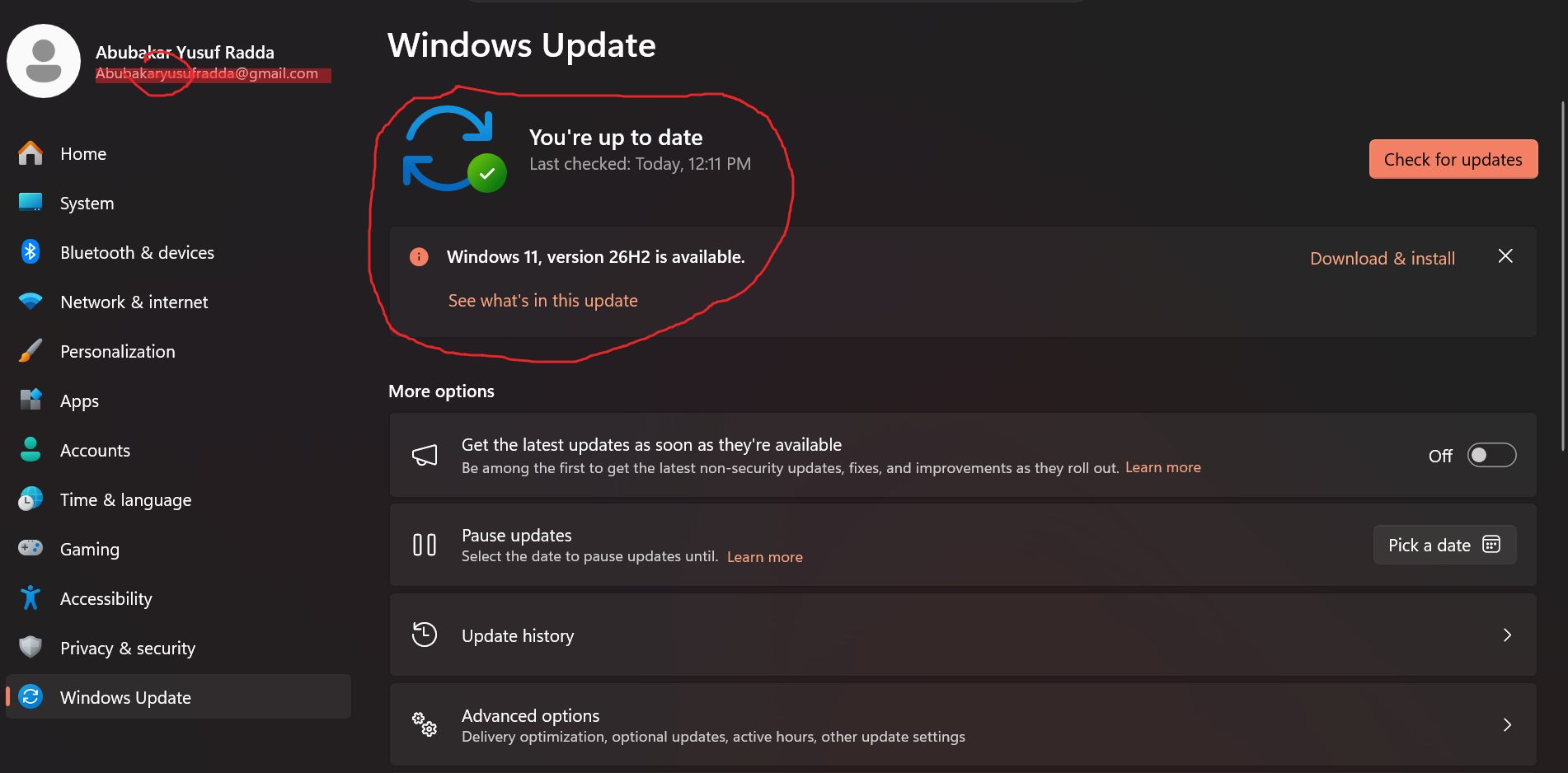
On paper, Windows 11 version 26H2 is one of the least dramatic Windows updates in years. It is delivered as a tiny enablement package, it adds no new hardware requirements, and Microsoft’s launch post is mostly about housekeeping. Yet within days of its September 29 release, users and several tech outlets were posting screenshots of Task Manager showing two or three gigabytes less memory in use at idle.
For anyone running a 16GB laptop, and especially for developers who keep a browser, wallets, containers and a Linux subsystem open at once, that is worth understanding properly.
This article separates three things that coverage often blurs: what Windows Latest and Reddit users measured, what Microsoft has confirmed, and what the numbers mean for real workloads, including Web3 development. It also explains why idle memory is a misleading number, how to measure your own machine fairly, and who should update now.
How this article was researched
We did not benchmark Windows 11 26H2 ourselves. We read Microsoft’s own announcement, Microsoft-sourced coverage of its October 15 blog post, the original Windows Latest findings as relayed by other outlets, and several independent write-ups gathered on October 21, 2026.
One outlet that covered the story (XDA Developers) blocks automated access, so we only saw a search-result summary of it. Several of the secondary sources are smaller sites, and one of them describes its own research as AI-assisted, so we use it only for facts that other sources also support.
Two limits matter. First, almost all the RAM figures are from individual test systems or forum reports, which are anecdotal rather than controlled. Second, Windows memory behavior depends heavily on hardware, drivers, startup apps and what was open, so no single number describes every PC.
What Windows 11 26H2 actually is
The first thing to understand is that 26H2 is not a conventional new operating system build. Microsoft announced the Windows 11 2026 Update, version 26H2, on September 29, 2026 and delivers it as an enablement package to eligible PCs running version 25H2 or 24H2.
Microsoft explains that versions 24H2, 25H2 and 26H2 share a common servicing branch and underlying code base, so many of the components for 26H2 are already on a PC before the update arrives. It also says that select features shipped switched off in 25H2 are switched on by default in 26H2.
In practice that means a small download and one restart. PC-Welt reported the package is only about 174KB. Rollout is phased, and Microsoft says it will expand availability over time and publish known issues through its release health hub.
One group is excluded: PCs on Windows 11 version 26H1 cannot upgrade directly to 26H2, because 26H1 uses a different Windows core, according to BetaNews. PC-Welt says 26H1 is the special build for machines with Snapdragon X2 processors and NVIDIA’s RTX Spark, which links to our coverage of those platforms in the AI hardware guide.
This matters for the RAM story. If most of 26H2’s code was already delivered through monthly updates, then any memory improvement may have arrived earlier in cumulative updates and simply become visible, or been activated, with the enablement package. Windows Latest itself said it was unclear what changed, as relayed by OC3D.
Two practical notes for admins and individuals: Windows 11 24H2 Home and Pro editions reached the end of updates on October 13, 2026, per TechRepublic-related coverage and PC-Welt, so staying on 24H2 is no longer a neutral choice. And Microsoft’s release health page listed three issues as mitigated at launch, according to iTechGuides: some USB Audio Class 1.0 devices, a domain-trust issue involving some accounts protected by Credential Guard, and black-screen or desktop-loading reports in some virtual desktop environments.
What users and testers reported

The numbers that started the conversation came from Windows Latest, which tested 26H2 on a laptop with 16GB of memory. Before the update, the machine usually showed about 10GB in use at idle. Afterward it showed about 7GB, with 4GB of that cached and 8.8GB available. Guru3D’s summary stresses that this describes one test system, and notes the update’s memory change was not on Microsoft’s public feature list at the time.
Other reports, summarized by Guru3D, KitGuru, HotHardware and WindowsForum, include:
| Report | Hardware | Reported change | Caveat |
|---|---|---|---|
| Windows Latest | 16GB laptop | Idle about 10GB to about 7GB | One system; not a controlled comparison |
| Reddit users (as relayed) | Various | Around 2GB lower, up to 3GB | Self-reported; conditions unknown |
| Reddit user (as relayed by WindowsForum) | 48GB PC | About 6.9GB to about 4.8GB at boot | Single anecdote |
| XDA Developers writer | 2022 laptop with 32GB | About 8.5GB to about 6.7GB idle | Summary seen via search snippet only |
| Windows Latest stress test (as relayed) | 16GB laptop | Memory stayed under 90% under a multitasking load, versus higher before | Test conditions not confirmed identical |
| Reports on 8GB machines | 8GB PCs | No meaningful improvement reported; one still at about 96% | Small number of reports |
A pattern is visible: the reported gains cluster on machines with 16GB or more, and the biggest absolute drops appear on 32GB and 48GB systems, according to the XDA snippet. The 8GB machines, which would benefit most, mostly report nothing.
Windows Latest also reported that the Low Latency Profile expanded to more applications, with Edge and Outlook launching about 40% faster in its testing and, per KitGuru’s relay, interface elements such as the Start menu up to 70% faster. Those are the publication’s own measurements, not Microsoft’s.
What Microsoft has confirmed
The story changed on October 15. In a Windows Experience Blog post, Navjot Virk, Microsoft’s corporate vice president for Windows experiences, said improvements developed with Windows Insiders are beginning to roll out broadly, and described three headline claims, as reported by TweakTown, BetaNews and others:
- Windows 11 is now “up to 20% more responsive.”
- On 8GB PCs, Windows can keep up to 2GB more of your active data in memory instead of moving it to slower storage.
- On PCs with 8GB of memory or less, Widgets load only when opened, freeing more than 200MB.
The second claim is easy to misread, and Pureinfotech spells out the distinction: the 2GB figure refers to additional active data that can stay in memory, not a 2GB reduction in total RAM consumption. Guru3D adds that the claims do not mean every 8GB system will gain 2GB free or become 20% more responsive, and that independent testing is needed.
The Next Web notes that the one published hands-on test of an 8GB machine found no change, and that none of Microsoft’s memory claims came with a measurement.
So here is where things stand. Microsoft has confirmed that it improved memory management and that it focused on low-memory PCs. It has not confirmed that these changes caused the 2 to 3GB idle drops seen on 16GB and larger machines, and the two sets of claims describe different mechanisms. It is plausible they are related. It is not established.
Why idle RAM numbers mislead
A Task Manager figure feels like a verdict, but it is closer to a snapshot of a system doing its job.
Windows deliberately uses spare memory. The operating system caches applications and data so they open instantly. Memory used this way is not wasted, and Windows gives it back when something else needs it. That is why Windows Latest’s figure included 4GB cached and 8.8GB available alongside the 7GB in use.
“In use” and “available” tell different stories. A machine with a high in-use number but plenty available is healthy. A machine with low available memory and heavy disk activity is struggling. Looking at only a percentage hides this.
Idle is not your workload. A PC that idles at 7GB instead of 10GB has more headroom, but the benefit shows up when you open the next browser tab, container or application, and is hard to read from the desktop alone.
Many things move the number. Startup apps, browser tabs restored after a restart, cached data, driver versions and even the first boot after an update can change the figures. Notebookcheck cautioned that nothing proves 26H2 itself caused the drop, according to WindowsForum’s summary.
Lower use is not automatically faster. Memory that is reclaimed faster, or compressed, can help or hurt depending on the CPU cost. This is why responsiveness under real multitasking is the better test.
The Low Latency Profile, explained
The other 26H2 headline is a feature that sounds like a memory tweak but is not. Windows Latest, as summarized by Guru3D, says the Low Latency Profile, previously limited to certain Microsoft apps built into Windows, now applies more widely. It briefly raises the processor to its maximum frequency for one to three seconds when an app launches, aiming to cut startup delays.
This is about responsiveness, not RAM. The reported gains, about 40% faster launches for Edge and Outlook, and larger gains for interface elements, came from Windows Latest’s own testing. Our general expectation, which we did not test, is that a brief frequency boost helps older or slower processors most, and that on laptops it may cost a little battery, since the processor spends a moment at full speed. Treat that as a hypothesis, not a finding.
What it does mean is that some of the “26H2 feels snappier” reports may come from faster launches rather than from lower memory use, and the two effects are easy to conflate.
How to measure your own PC fairly
A before-and-after comparison is only useful if the conditions match. A fair approach:
- 1. Record a baseline before updating, if you can. Restart, wait a few minutes for startup tasks to settle, and open Task Manager, then the Performance tab, then Memory.
- 2. Note more than the percentage. Write down in use, available, cached and committed figures.
- 3. Repeat after updating, under the same conditions: same startup apps, same open windows, same browser tabs.
- 4. Run a realistic workload. Open the apps you actually use together, and note whether the system stays responsive and how much available memory remains.
- 5. Judge by feel as well as by number. If nothing changes in how your PC behaves, a lower number is a curiosity, not a win.
- 6. Compare like with like. Do not compare a freshly rebooted machine with one that has been running for days.
If you manage a fleet, pilot the update on a few representative machines first and watch the release health hub for known issues, as the Microsoft announcement itself recommends.
What it means for Web3 and developer workloads
For a developer, memory is a budget, and Windows takes its share before your tools start. If 26H2 returns two or three gigabytes on a 16GB machine, that is a real change. Whether it matters depends on what you run.
What a Web3 workday actually loads. A typical stack combines a browser with wallet extensions and several dapp tabs, an editor or IDE, a Linux environment through the Windows Subsystem for Linux (WSL), containers, a local test chain or mainnet fork, and sometimes an indexer or database. Solana’s setup guide states that Windows development happens inside WSL, so Solana and Rust work on Windows runs through that layer, and its build steps can be memory-hungry.
WSL2 and containers have their own memory rules. WSL2 runs a Linux virtual machine whose memory is separate from the figure Task Manager shows for Windows apps, and it can be capped with a configuration file. From our general knowledge, the default cap is a fraction of the host’s RAM, but we did not verify the current default for this article, so check Microsoft’s WSL documentation before relying on it. The practical point: a lower Windows idle footprint does not automatically make a Linux VM or container stack use less.
Node software is a different class of problem. Official guidance shows how far a developer laptop sits from node hardware. Ethereum’s documentation has listed anywhere from 8GB to 16GB as a baseline in older versions, and newer text we saw points to 16GB (32GB recommended) and, via EIP-7870, 32GB (64GB when validating) with a 4TB NVMe drive. Solana validators are server-class machines, and one deployment guide lists 256GB or more of RAM. A 2 to 3GB change in Windows idle usage is irrelevant at those scales.
See our Web3 developer hardware guide for detail, and verify the newer Ethereum figures against the official English page.
Here is how the reported savings play out across common setups. This is editorial analysis, not a measurement:
| Setup | Typical situation | Effect of roughly 2 to 3GB saved |
|---|---|---|
| 8GB laptop | Tight even for a browser plus editor | Not reported to help; Microsoft’s 8GB changes are different and unproven |
| 16GB laptop, contracts and front end | Comfortable until many tabs and a VM | Welcome headroom; may delay paging |
| 16GB laptop, WSL2 plus containers plus a local fork | Often memory-bound | Helps at the margin, but you will still hit limits |
| 32GB workstation | Comfortable for most workflows | Marginal |
| 64GB or more | Heavy multi-service or ZK work | Negligible |
The more important Web3 point is security, not RAM. Developer machines hold signing keys, API credentials and access to repositories. Windows 11 24H2 Home and Pro stopped receiving updates on October 13, 2026, according to coverage of Microsoft’s lifecycle information, so a developer still on 24H2 is running an operating system without security patches. Moving to 26H2 through the small enablement package is the cheaper fix, and that matters more than any memory gain. Keep your keys in a hardware wallet and off the dev machine regardless.
Practical tips. Cap WSL’s memory so a runaway container cannot starve Windows, keep repositories inside the Linux file system for better performance (general guidance, not benchmarked here), close memory-heavy desktop apps such as chat clients when you do builds, and watch available memory rather than the in-use percentage. If you routinely run out of memory, buying more RAM is a more dependable fix than hoping for an update to give some back, and soldered-memory laptops cannot be upgraded later.
A note for Arm developers. Windows 11 26H1, the build used on some Snapdragon X2 and RTX Spark machines per PC-Welt, cannot upgrade directly to 26H2 and, according to Microsoft as reported by BetaNews, will get a path to a future release. If you own such a machine, none of the 26H2 findings apply to you yet.
What it means for 8GB PCs, everyday users and IT admins
8GB PCs. This is where the story gets uncomfortable. Microsoft’s October 15 claims target 8GB machines, but the only published hands-on test of one that we found showed no change. Microsoft’s two concrete changes, keeping more active data in RAM and loading Widgets only when opened, are plausible helpers, but the company published no measurements. If you own an 8GB PC, expect a modest effect at best, and judge it by how the machine behaves with your usual apps.
16GB and larger PCs. Reports of lower idle memory are strongest here. Whether you see them depends on your software and drivers.
Everyday users. The update is small, and Microsoft says Windows Update behavior and Windows Hello sign-in also improved in the same set of changes, as relayed by BetaNews. Back up first, as with any update, and confirm after installing that your PC reports 26H2.
IT admins. Treat it like a routine servicing update, not a migration, but still pilot it.
Microsoft’s release health hub lists mitigated issues involving some USB Audio Class 1.0 devices, a domain-trust issue for some accounts protected by Credential Guard, and black-screen reports in some virtual desktop environments. Check the hub for current status before wide deployment, and do not force an installation around a safeguard.
The memory-price backdrop
The reason this story attracts attention is the market it landed in. TrendForce’s September 30 forecast, as summarized by WindowsForum, expects conventional DRAM contract prices to rise 10 to 15% quarter on quarter in the fourth quarter of 2026 and NAND Flash prices to rise 15 to 20%, with the market remaining undersupplied because suppliers prioritize server capacity. We saw this figure only through a secondary summary, so confirm it with TrendForce.
The Next Web reports that Gartner expects sub-$500 PCs to nearly disappear by 2028, and Guru3D notes that high RAM prices have led some PC makers to ship 8GB configurations instead of 16GB. In that environment, an operating system that wastes less memory is valuable, but it is not a substitute for buying enough. Our laptop and developer hardware guides recommend 16GB as a floor and 32GB for heavier work for the same reason.
Should you update now?
Update soon if you are on Windows 11 24H2, because support for Home and Pro ended on October 13, or if your PC is on 25H2 and Windows Update offers 26H2. The enablement package is small and low-risk by design.
Pilot first if you manage many machines, rely on USB Audio Class 1.0 devices, use Credential Guard-protected accounts in a domain, or work in virtual desktop environments, given the issues Microsoft listed at launch.
Do not expect a guaranteed 2 to 3GB saving. Treat it as a possible bonus, and measure your own system.
Do not plan purchases around it. Skipping a needed RAM upgrade because of unconfirmed savings is a gamble, as is waiting for prices to fall.
Frequently asked questions

Does Windows 11 26H2 reduce RAM usage?
Many users and one hands-on test report lower idle memory use on PCs with 16GB or more, often by 2 to 3GB. Microsoft has not confirmed that 26H2 caused those drops, and results vary by system.
What did Microsoft actually say about memory?
On October 15, Microsoft said Windows can keep up to 2GB more active data in memory on 8GB PCs and that Widgets load only when opened on PCs with 8GB or less, freeing more than 200MB. It also claimed Windows 11 is up to 20% more responsive. The 2GB claim is not the same as a 2GB drop in total memory use.
Will it help my 8GB PC?
Microsoft says 8GB machines benefit most, but the early independent test we found showed no change. Judge it by responsiveness with your own apps.
Is 26H2 a big update?
No. It is a small enablement package for PCs running 24H2 or 25H2, which share a servicing branch with 26H2. Some features that were off by default in 25H2 are on by default in 26H2.
What is the Low Latency Profile?
A feature that briefly raises CPU frequency during app launches, reported to speed up launches of apps such as Edge and Outlook by about 40% in Windows Latest’s testing. It improves responsiveness rather than reducing memory.
Is high RAM usage in Task Manager bad?
Not by itself. Windows caches data in spare memory for speed. Look at available memory and how your system behaves under load.
Do I need to update from 24H2?
Yes, in practice. Windows 11 24H2 Home and Pro stopped receiving updates on October 13, 2026.
Does this change how much RAM a Web3 developer needs?
No. At most it returns a couple of gigabytes on 16GB machines. Containers, WSL2 virtual machines, local forks and nodes still set your requirements, so 16GB is a floor and 32GB is the comfortable target for heavier work.
Can PCs on Windows 11 26H1 get 26H2?
Not directly. 26H1 uses a different Windows core, and Microsoft says those devices will have a path to a future release.
The honest summary is encouraging but incomplete. Several independent users and a few outlets report that Windows 11 26H2 leaves 2 to 3GB more free at idle on PCs with 16GB or more. Microsoft’s own memory claims, announced on October 15, point to real engineering work on low-memory machines, but they describe a different effect and came without measurements, and the only early test on an 8GB PC saw no gain.
For Web3 developers and other heavy multitaskers, the lesson is not to chase a number in Task Manager. Update because 24H2 is no longer supported, measure your own machine fairly, watch available memory, and buy the RAM your real workload needs. Windows getting leaner is welcome, but it does not change what a node, a container stack or a local fork demands.
For more practical guidance, see our developer hardware and laptop guides on Web3FuturePro.com.
Sources
URLs below were returned during our October 21, 2026 research. Several are secondary or smaller sites; verify key claims on Microsoft’s own pages.
- 1. How to get the Windows 11 2026 Update. Microsoft Windows Experience Blog, September 29, 2026. Availability, enablement package, shared servicing branch.
- 2. Windows 11 26H2 users report lower idle RAM use and faster launches. Guru3D (relaying Windows Latest and Reddit).
- 3. Windows 11 update reportedly cuts idle RAM usage and speeds up app launches. KitGuru.
- 4. Windows 11 26H2 cuts RAM usage and boosts performance. HotHardware.
- 5. Windows 11 26H2 update quietly shipped with vital RAM improvements. OC3D, October 5, 2026 (relaying Windows Latest).
- 6. Windows 11 26H2 gave my laptop nearly 2GB of RAM back, but there’s a catch for low-RAM PCs. XDA Developers (seen via search summary only; the site blocks automated access).
- 7. Windows 11 26H2 may cut idle RAM use by 2 to 3GB on 16GB PCs, but it’s unconfirmed. WindowsForum (describes its own research as AI-assisted; used only for corroborated points and the TrendForce summary).
- 8. Microsoft says Windows 11 is up to 20% more responsive and runs better on 8GB PCs. TweakTown.
- 9. Microsoft is making Windows 11 use RAM more efficiently, especially on 8GB PCs. Pureinfotech. Clarifies the 2GB figure.
- 10. Windows 11 can hold up to 2GB extra in RAM on 8GB PCs. BetaNews.
- 11. Microsoft says Windows 11 memory updates improve performance on 8GB PCs. Guru3D.
- 12. Microsoft says Windows 11 is now up to 20% more responsive and better on 8GB of RAM. The Next Web. Early 8GB test, Gartner outlook.
- 13. Windows 11 26H2 rolls out as a small download for 24H2 and 25H2 PCs. BetaNews. 26H1 exclusion.
- 14. Windows 11 26H2 Update: Which PCs Get the Enablement Package. TechRepublic.
- 15. Windows 11 26H2: Erscheinungstermin, Neuerungen, Downloadgroesse. PC-Welt. 174KB package size, 26H1 on Snapdragon X2 and RTX Spark, 24H2 end of updates.
- 16. Windows 11 26H2 enablement package eligibility. iTechGuides. Launch known issues.
- 17. Ethereum node hardware guidance. ethereum.org (see our Web3 developer hardware guide for the versions cited).
- 18. Set up local development. Solana documentation. WSL requirement on Windows.